Screenplay formatting cheat sheet
Stop trying to put your script into a word doc right now, babe! You’re torturing yourself. We hate to see it! If you’re struggling with nailing your first (or hundredth) script, there’s a good chance you’re actually (or also) struggling with screenplay formatting. This is the guide you didn’t know you needed.
This cheat sheet will help you on what we can think of as a three-step journey.
Step one: Get the format out of your WAY. Maybe this is where you are now. If so, it probably feels like you can’t just write what you WANT to because the formatting needs everything to be “just so.”
Step two: Stop hating the format. Neutral is better than negative! Famously. But, it’s not the end goal. If you’re feeling this way, the format may not HINDER you like it once did, but it’s still something you “have to” use.
Step three: Allow the format to actually propel your scripting. Now, THIS is the goal. If you can get over the hump of neutrality, there is a golden city on the other side. From this place, your ideas and story start to be informed BY screenplay format, rather than the other way around. Kinda like muscle memory. Your brain will stop thinking about (or obsessing over) the details that don’t have a home in your actual script. Eventually, you’ll start to think in scenes, action, dialogue, and even slug lines.
Standard screenplay formatting lets professionals read easily (and fast), budget correctly, and take your script seriously. There’s still room for your VOICE and lots of fun jokes, so use this cheat sheet as your one stop REMINDER of what goes on the page (and what stays in the brainstorming doc).
1. Scene Headings (Slug Lines)

Scene headings are extremely literal. Not only does it help readers know (literally) where and when your scene is happening, but it also tells producers when and where they’ll need to shoot.
- INT. or EXT. — Is the scene happening inside or outside?
- The location — Where does the scene take place?
- The time of day — Is it day or night?
Usually, it’s a basic location (CAFE) and day/night.
Sometimes, you need a specific location (WHITE HOUSE SITUATION ROOM) and a specific time of day (DAWN).
That’s it. Literal. Clear. Repeatable.
2. Action
Action is always written in present tense.
This forces you to write in a way that:
- Informs the pace
- Drops readers right into it
- Creates a sense of immediacy
- Insists on visual, literal, sensory storytelling
If you can say the same thing in two words instead of eighteen, say it in two. It keeps the script moving. And remember: action describes what we can see or hear. Never the internal motivations of a character.
Think:

vs.

3. Character snapshots
When you introduce a character for the first time:
- Name in ALL CAPS
- Age range
- Necessary visual descriptors
- A small splash of personality
Example:

That’s all you need. Give readers just enough to instantly understand who this person is. These snapshots help your characters STICK in readers’ minds.
4. Character name above dialogue
When a character speaks:
- The name is capitalized
- The name is centered
- It appears directly above the dialogue
Screenwriting software does this (and margins! And so much stuff!) automatically. Use screenwriting software. Please! For me!
5. Dialogue basics
Dialogue is key. It sits in the middle of the page with giant margins that are basically arrows pointing at it. Because it’s so important. Write like you know that!
Also: Paragraph breaks don’t exist in a script.
If you’re writing a really long monologue, you cannot break it into paragraphs. You have to find other ways to control the pace.
6. Parentheticals (are rarely used)
Parentheticals are a tiny hint about how to deliver a line. That’s all they are.
They are not:
- Action
- Details
- Backstory
Don’t: put action in a parenthetical! Do: move that movement into an action line (left margin) and let it set the pace and/or break up your dialogue.
Example of a proper parenthetical:
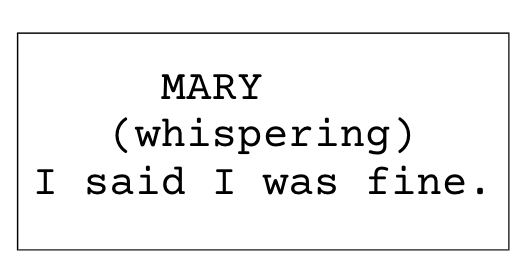
“Whipsering” works because it’s a note (intended for actors) about how to deliver the line.
Parentheticals should not be overused. Rarely is often enough. Maybe too often. If you have a parenthetical on every page of your script–delete them! Trust your actors. This is their job.
7. Interruptions
For interruptions, you can use a dash.
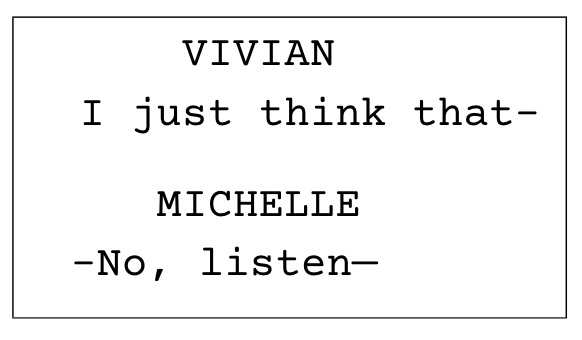
Simple. Clean. Totally normal.
8. Simultaneous dialogue
Dialogue said at the same time often gives a “real” feeling to your script. People in the real world talk at the same time!
Screenwriting software usually has a command (often Command+D) that places two lines side by side at the same vertical position.
9. Phone calls and INTERCUT
Phone conversations can be tricky to script. Two people in two different locations talking to each other at the same time?
Technically, that’s two scenes. Formatting-wise, that makes things WEIRD.
The solution: INTERCUT.
You can:
- Add INTERCUT: to the slug
- Or combine locations in a slug like:

The reader understands you’re cutting between the two.
Clarity wins. Clarity always wins.
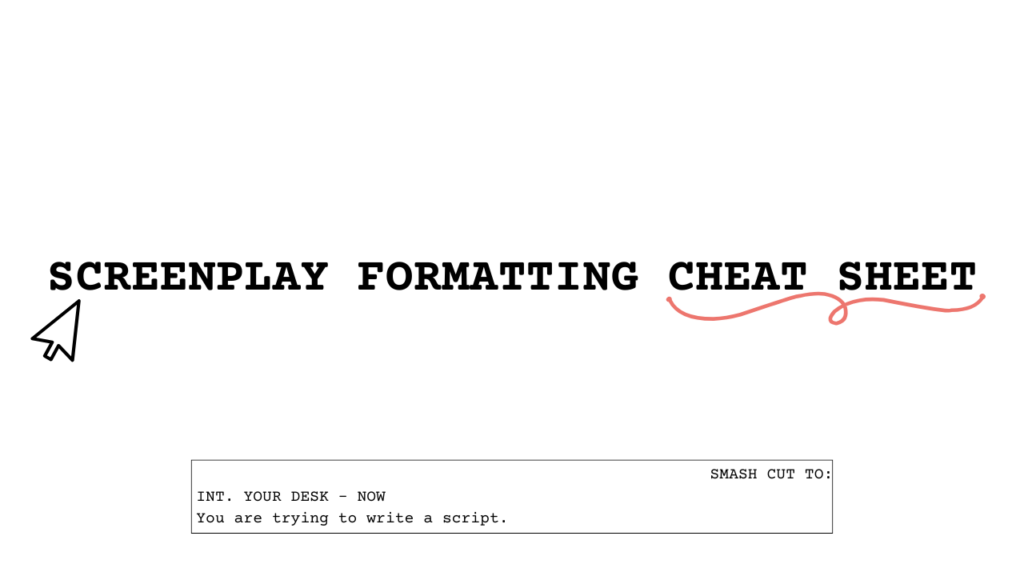
10. Transitions are for pacing
Transitions appear at the bottom right of the page:
- CUT TO:, FADE OUT:, DISSOLVE TO:, SMASH CUT TO:
Don’t use them between every scene. (Not because you can’t, but because you don’t have to.) Instead, use them to convey pace or mood.
Example:
LESLIE is late for dinner and says:
“I was really busy.”

Then, smash cut back to dinner. That’s how you punch a verbal joke with visual PROOF.
Final reminder
Formatting controls:
- Professionalism: You don’t want typos on your resume, and you don’t want formatting errors in your script!
- Pace/Tone: Line length, transitions, scene breaks, and act outs–all inform the pace and tone of your overall script.
- Overall Readability/Quality: First, you need the formatting to get out of your way. Then, you can get it to propel your writing forward.
Seriously, this is why screenwriting software exists. There are too many free options NOT to use one! Afterall, if your script looks wrong, industry readers will assume it is wrong.
Your job is to remove that friction. Our job is to HELP YOU.
Want to learn more about all things SCRIPT? Check out our upcoming classes and workshops.